Arc Tool is a free After Effects preset designed to automate the creation of fully vector arcs, rings, and pie charts. Instead of manually building circular rigs, it generates a ready-to-use structure that allows you to focus directly on design and animation.
Traditional workflows for circular charts often rely on the Radial Wipe effect, which is harder to scale, less flexible, and not ideal for complex animation systems. Arc Tool replaces this with a clean Shape Layer based approach that stays fully editable and integrates naturally with modern After Effects workflows, including 3D extrusion for animated data visualizations.
Arc, Ring, or Pie Chart
Switch between arcs, rings, and full pie charts using intuitive controls inspired by Figma’s Arc Tool. Adjust sweep and thickness values to create a wide range of circular graphics from a single shape.
Smart Auto-Sequencing (1–8 Arcs)
Choose between 1 and 8 segments using a simple dropdown menu. Arc Tool automatically calculates the position of every arc, making sequential pie chart animations effortless.
Individual Color Controls
Give each arc its own unique color or create a consistent palette across the entire chart. Dedicated color controllers make it easy to build clean infographics and vibrant data visualizations.
Independent Arc Thickness
Each segment can have its own thickness, making it easy to create more dynamic pie charts and stylized circular graphics. Switch between a uniform look or customize every arc independently.
Advanced 3D Extrusion Ready
Built entirely with native Shape Layers, Arc Tool works seamlessly with After Effects’ Advanced 3D Renderer. Instantly extrude pie charts and circular graphics into fully 3D visualizations without rebuilding your artwork.
Great tools should solve problems, not create paywalls.
Arc Tool is completely free. Just enter $0 on the download page and you’re ready to go.
The download is hosted on Gumroad so you can easily receive notifications whenever new versions or updates are released.
If Arc Tool improves your workflow, the best way to support the project is by sharing it with fellow motion designers. The goal is to create practical tools for the Motion Design and Adobe communities that make everyday work faster, simpler, and more enjoyable.
How to install
After downloading the ZIP archive, extract its contents and locate the included preset file. Copy the preset into a folder named Bartlomiej Otlowski inside your After Effects Presets directory. If the folder already exists, simply place the new preset inside it. Keeping all presets in a dedicated folder makes them easier to find both on your hard drive and within the Effects & Presets panel in After Effects.
You can install the preset in any of the standard preset locations:
Windows
- Windows (Program Directory): Program Files\Adobe\Adobe After Effects\Support Files\Presets
- Windows (User Directory): Documents\Adobe\After Effects\User Presets
Mac
- macOS (Application Directory): Program Files\Adobe\Adobe After Effects\Support Files\Presets
- macOS (User Directory): Documents\Adobe\After Effects\User Presets
How to use
Once installed, locate Arc Tool in the Effects & Presets panel and double-click the preset.
Arc Tool automatically creates a new Shape Layer with all controllers already connected and ready to use. Every setting is exposed in the Effect Controls panel, making it easy to build and animate circular graphics without touching Shape Layer internals or setting up expressions. Simply generate the layer and focus on design, not setup.
Note: Before using Arc Tool, make sure your project is using the JavaScript expression engine. You can check this under File > Project Settings > Expressions > Expression Engine, then select JavaScript.
How to use with KBar
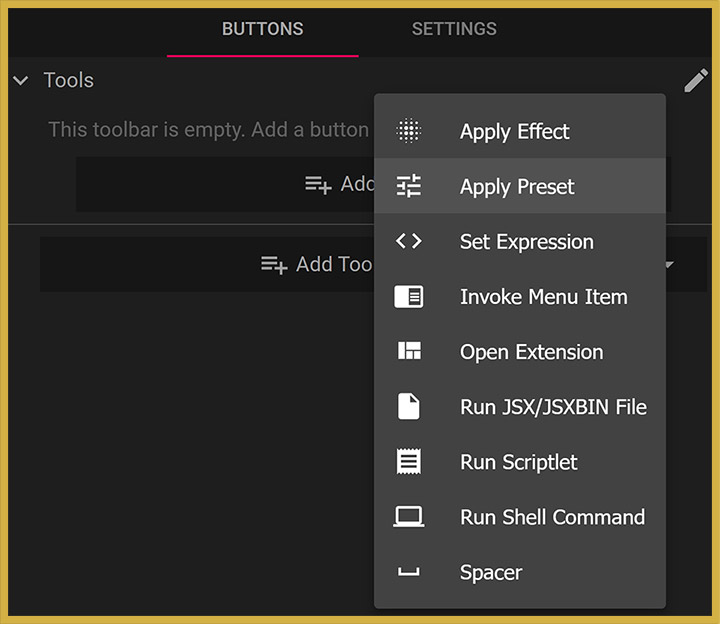
Arc Tool includes a custom SVG icon, making it easy to integrate directly into your KBar workspace for even faster access.
To create a dedicated Arc Tool button, open KBar Settings, click Add Button, select Apply Preset, and choose the included Arc Tool.ffx file. Then assign the provided SVG icon, enter a button name, and confirm your settings.
Once configured, Arc Tool can be applied directly from your KBar panel, making it a natural addition to an efficient After Effects workflow.
FAQ
Yes. Arc Tool is available free of charge. Simply enter $0 on the download page to get the latest version.
Gumroad requires a “pay what you want” price for free products. If you’d like to download Arc Tool for free, simply enter $0 in the price field.
Hosting Arc Tool on Gumroad makes it easier to notify users about new releases, updates, bug fixes, and future improvements. This helps ensure everyone has access to the latest version of the tool without needing to manually check for updates.
Arc Tool was built in After Effects 2025. Due to how After Effects handles animation presets (.ffx), backwards compatibility is not supported. If you’re using After Effects 2025 or newer, Arc Tool should work as expected.
Yes. Arc Tool can be used in both personal and commercial projects, including client work and professional productions.
Changelog
Version 1.2 — 2026.07.30
- New
- Added Direction control for switching between clockwise and counterclockwise
Version 1.1 — 2026.06.06
- Improvements
- Added Master Sweep Start and Master Sweep End controllers for global control over arc trimming and animation.
Version 1.0 — 2026.05.30
- New
- Initial public release of Arc Tool.
- Create fully vector arcs, rings, and pie charts using native Shape Layers.
- Automatic pie chart generation with support for up to 8 segments.
- Individual controls for segment colors.
- Uniform or independent thickness controls for each arc.
- Automatic arc sequencing and spacing.
- Global rotation and offset controls.
- Ring mode for creating circular progress indicators and donut charts.
- Compatible with After Effects’ Advanced 3D Renderer for extruded pie charts and circular graphics.
Do you like this tool?
Tell me about your thoughts. I would love to hear your feedback.